OST2 – From Zero to QEMU

Ready to reverse-engineer an 8-bit CPU and fuzz a GameBoy emulator? Join FuzzSociety to deploy a fully configured Linux desktop directly in your browser.
Claim your 6-hour free session with the coupon (refills at just $10/6h).
Scroll down to choose your attack vector: our frictionless Fast-Track cloud lab, or the raw, self-hosted Docker shell.
                        From0toQEMU
                        copy on click
The Art of Emulation and Fuzzing
Welcome to the “From Zero to QEMU” operational module. An academic path structured by OST2 that guides you from the fundamentals of CPU emulation, through the instrumentation of a real-world emulator (QEMU), up to writing advanced fuzzing harnesses against emulated targets.
Theory is fundamental, but execution is everything.
In this course, we won’t just write code: we will vivisect binaries, inject logic into decoding pipelines, and force CPUs to reveal their secrets.
Environment Setup
Choose Your Attack Vector
To tackle the emulation and fuzzing labs, you need a Linux environment configured with the right dependencies (including Python 3 for stability tests). Here is the crossroad: you can choose our platform’s “Zero Friction” approach, or the “Spartan” terminal approach in total autonomy.
Option A: FuzzSociety Fast-Track
Recommended. Complete Desktop Environment.
Don't waste brain clock cycles configuring the infrastructure. Focus only on reverse engineering and code. Our platform provides you with a complete and interactive Linux Desktop environment, isolated and rendered directly in your browser. No VPN, no local Virtual Machine, zero plugins.
- Register for free on FuzzSociety.
- Apply the coupon From0toQEMU at checkout.
- Click the Hammer icon (Push Hammer for Deploy).
Result: In seconds, you will have a pre-configured container with a GUI, source code, a web browser already installed in the environment, and all necessary tools fully operational in full screen.
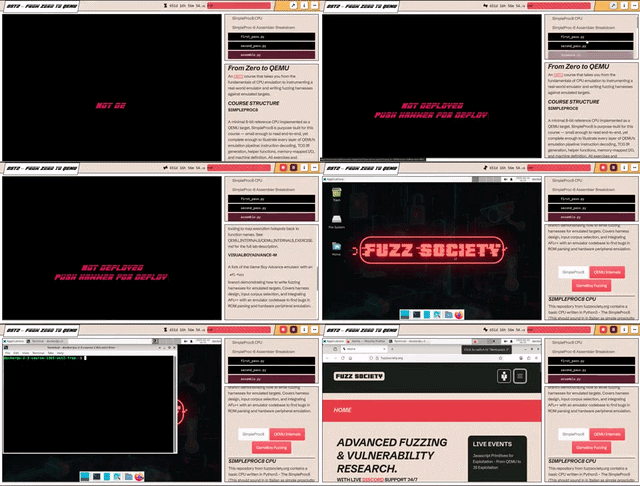
You have 6 real hours of machine time included for free (where 1 credit = 1 minute of execution). You are not forced to burn them in a single grueling session; you have total control over your infrastructure’s burn-rate:
- Stop: Drastically lowers consumption. In stop state, the environment is frozen and the cost drops (1 credit covers 10 minutes instead of 1). Your 6 hours of uptime turn into 60 hours of standby.
- Destroy: Finished the lab or want to start fresh? Destroy the container. Credit consumption drops to zero instantly. Your remaining balance stays untouched until your next deploy.
If you need to dig deeper, you can reload your account with packages of just 10€ for an additional 6 hours of intensive processing (360 credits).
Option B: Autonomous Deployment
The Shell Way
If you are an infrastructure purist, love the thrill of troubleshooting, and don't need graphical interfaces, you can download the public image and build the lab locally.
Note: The public image provides exclusively a shell, the code repository, and the markdown files. No desktop environment, no browser to check documentation on the fly, just bare command line.
- Install Docker on your host system (including any WSL2 troubleshooting if you are on Windows).
- Configure virtualization modules and cross-architecture emulation (like qemu-user-static or Rosetta), an essential step to manage hardware architectures, especially if you are on Apple Silicon ARM64 and need to run the environment and binaries compiled for x86_64.
- Pull the image: docker pull fuzzsociety/ost2-qemu:latest
- Launch the container in interactive mode and prepare to live in the terminal.
- Monitor the logs and RAM/CPU consumption of your host machine during intensive fuzzing sessions with AFL++.
COURSE STRUCTURE
SimpleProc8: The Foundation
A minimal 8-bit reference CPU, implemented as a QEMU target and written in Python3 (sounding very Italian: simple prosciutto). SimpleProc8 was custom-built for this course: small enough to be read end-to-end, yet complete enough to illustrate every single layer of QEMU’s emulation pipeline. All exercises and explanations reference this CPU first before moving to real-world targets.
Assembler Breakdown
A Two-pass Assembler to convert assembly code into binary machine code. Here are the core scripts powering the logic:
                        def assemble(self, assembly_code):
                        copy on click


                            self._first_pass(assembly_code)
                        copy on click


                            self._second_pass()
                        copy on click


                            #
                        copy on click


                            # ...
                        copy on click
Modules to manage the register architecture (A, B, C, D), the 8-bit address space, and the execution cycle.
Interpreter Core Explained
                        def __init__(self):
                        copy on click


                            # Initialize registers
                        copy on click


                            self.registers = {
                        copy on click


                                # ...
                        copy on click
QEMU Internals: Hands-on Lab
In this lab, you will apply what you learned from SimpleProc8 to a real ARM target. You will instrument QEMU’s TCG helpers to log arithmetic and logic operations executed by the emulated CPU.
You will need to run a stability tester across 100 executions to measure the system's determinism, using objdump-based tools to map execution hotspots back to function names.
                        cd qemu_stm32
                        copy on click


                        ./configure --python=/usr/bin/python2.7 ...
                        copy on click


                        ...
                        copy on click
                        timeout 60s ./qemu_stm32/arm-softmmu/qemu-system-arm \
                        copy on click


                            -nographic \
                        copy on click


                            -D /tmp/check ...
                        copy on click
                        #
                        copy on click


                        python3 test.py --runs 100
                        copy on click


                        #
                        copy on click
VisualBoyAdvance-M & GameBoy Fuzzing
The last mile. We will use a fork of the Game Boy Advance emulator featuring an afl-fuzz branch. This module demonstrates how to write lethal fuzzing harnesses for emulated targets (compilation via afl-cc or afl-c++), input corpus selection, and integration of AFL++ with the emulator’s codebase to uncover critical vulnerabilities.
